Money+

Your money, in a spreadsheet you own.

Money+ brings your accounts, budgets and net worth together in one place — and keeps every row in a Google Sheet that belongs to you.

Status: in limited testing. Not yet available on the App Store or Google Play.

Most finance apps keep your transactions. This one doesn't.

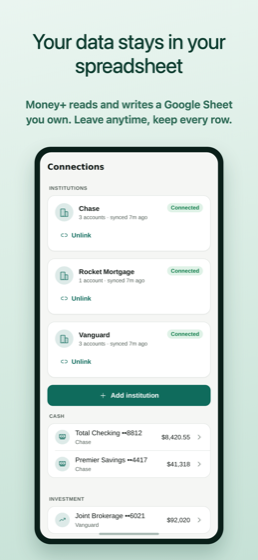
Money+ reads and writes a Google Sheet in your own Google Drive. You can open it, filter it, chart it, or walk away and keep every row.

There is no export button, because nothing was ever taken from you in the first place. Delete the app and the data is still yours, sitting in your Drive where it always was.

What it does

Everything you'd expect from a personal finance app, with the storage model turned inside out.

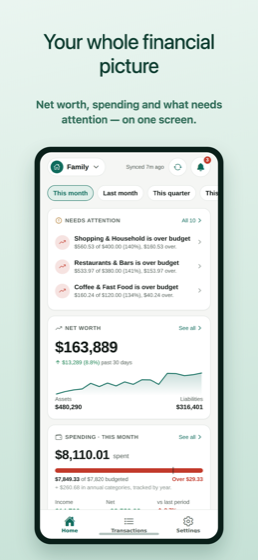
Everything on one screen

Net worth, this month's spending against budget, and whatever needs attention — over-budget categories, unusual charges, connections that need fixing. Switch to last month, this quarter or this year without digging.

Budgets that warn you in time

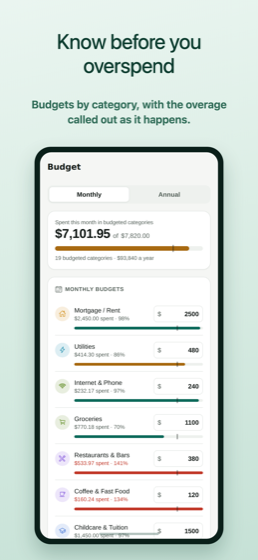
Set a budget per category and see the overage the moment it happens, not in a month-end summary. Annual categories are tracked by year rather than flattened into a monthly figure that never meant anything.

Categorize it once

Recategorize a transaction and Money+ offers to always do that. Rules apply to every matching transaction from then on, and you can edit them directly.

Catch recurring charges

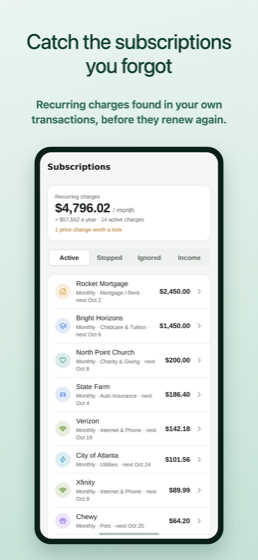
Subscriptions and repeating bills are detected from your actual transactions and listed with what they cost, so the ones you forgot about surface before they renew again.

Net worth over time

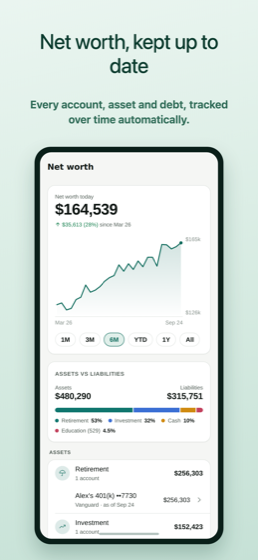
Cash, investments, property and debts in one figure, tracked as it moves. Add manual accounts for anything a bank can't provide.

Personal and shared, kept apart

Spaces keep your own money separate from the household's, and switch in a tap. Each space has its own sheet, budgets and categories.

Bank connections

Link accounts through Plaid. Money+ never sees or stores your bank password — the connection is made with the provider, and you can unlink any institution at any time.

Private by default

Lock the app behind Face ID. Hide amounts with a tap when someone is looking over your shoulder. No advertising, and nothing about your finances is sold or shared.
A look at it

Figures shown are synthetic demo data, not anyone's real finances.

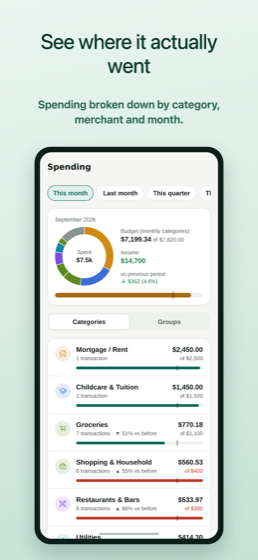
Home screen showing net worth, spending against budget and items needing attention Explanation that your data is stored in your own Google Sheet Budget screen with per-category spending Detected subscriptions and recurring bills Net worth tracked over time Spending breakdown by category

Support

Questions, problems, or anything about your data — we answer every message.

Email support
support@withplus.co — the fastest way to reach us.
Privacy questions and data requests
privacy@withplus.co
Deleting your account or data
Step-by-step instructions are at withplus.co/money-plus/delete-account.
Response time
We aim to reply within two business days.

Common questions

Where is my financial data actually stored?

In a Google Sheets spreadsheet in your own Google Drive. We do not keep a copy of your transactions. Our servers hold the encrypted credentials and connection settings needed to keep that Sheet up to date — the privacy policy lists exactly what those are.

Does Money+ see my bank password?

No. Bank connections are made through Plaid, and you enter your credentials into Plaid's own interface. We never see or store your online banking username or password.

What happens to my Sheet if I stop using Money+?

Nothing. It stays in your Google Drive with every row intact. Deleting your Money+ data does not delete your Sheets — that is deliberate, because they are your files.

How much does it cost?

Money+ is a subscription, with tiers that differ in how many bank institutions you can connect. The current price is shown in the app before you buy, and billing is handled by the App Store or Google Play.

Can I share with a partner or household?

Yes. Spaces can be shared with people you invite, with either view-only or full access, and you can withdraw access at any time. Each space has its own Sheet.

How do I delete my account?

In the app: Settings ▸ Delete my Money+ data. Full instructions, including what is and isn't removed, are on the account deletion page.